
[toc]
单词表
| 单词 | 词性 | 发音 | 含义 |
|---|---|---|---|
| attachment | 名词 | /əˈtætʃmənt/ | 附件 |
Lecture14-特定功能-实验06-文件下载
一、目标效果
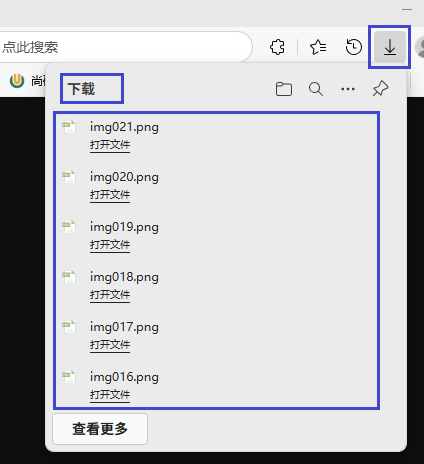
最终在项目运行时,点击“文件下载”超链接,不是打开一个新的页面,而是弹出下载提示框
二、实现方式
1、语法关键
通过设置响应消息头:
- 告诉浏览器,当前请求返回的响应,是一个附件(不是一个页面)
- 告诉浏览器,当前响应体的内容类型
- 告诉浏览器,当前响应体对应的文件名
在后端实现文件下载功能时,需要设置的关键响应消息头如下:
| 消息头名称 | 作用说明 | 示例值 |
|---|---|---|
Content-Type | 指定文件的MIME类型,告诉浏览器如何处理文件 | application/octet-stream(二进制流)、image/jpeg(图片)、application/pdf(PDF文件) |
Content-Disposition | 控制文件的展示方式(下载还是直接显示),并指定文件名 | attachment; filename="example.txt"(强制下载并指定文件名)、inline; filename="example.pdf"(浏览器内打开) |
Content-Length | 告诉浏览器文件的大小(字节数),用于显示下载进度 | 1024(表示文件大小为1024字节) |
Content-Transfer-Encoding | 指定文件传输的编码方式,二进制文件通常使用binary | binary |
Cache-Control | 控制浏览器缓存行为,避免下载的文件被缓存 | no-cache, no-store, must-revalidate |
Pragma | 兼容HTTP/1.0的缓存控制,与Cache-Control配合使用 | no-cache |
Expires | 指定缓存过期时间,通常设为0表示立即过期 | 0 |
其中,Content-Type和Content-Disposition是实现文件下载的核心消息头,其他消息头用于优化下载体验和兼容性。
2、核心API
①响应数据整体封装类
- 父类:org.springframework.http.HttpEntity
- 子类:org.springframework.http.ResponseEntity
下面列出了ResponseEntity的各个构造器:
public ResponseEntity(HttpStatusCode status) {
    this((Object)null, (MultiValueMap)null, status);
}

public ResponseEntity(@Nullable T body, HttpStatusCode status) {
    this(body, (MultiValueMap)null, status);
}

public ResponseEntity(
    MultiValueMap<String, String> headers,
    HttpStatusCode status) {

    this((Object)null, headers, status);
}

public ResponseEntity(
    @Nullable T body,
    @Nullable MultiValueMap<String, String> headers,
    int rawStatus) {
    this(body, headers, HttpStatusCode.valueOf(rawStatus));
}

public ResponseEntity(
    @Nullable T body,
    @Nullable MultiValueMap<String, String> headers,
    HttpStatusCode statusCode) {

    super(body, headers);
    Assert.notNull(statusCode, "HttpStatusCode must not be null");
    this.status = statusCode;
}
②响应消息头封装类
- 接口:org.springframework.util.MultiValueMap
- 实现类:org.springframework.http.HttpHeaders(有无参构造器)
3、示例代码
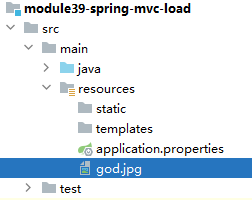
①准备待下载的文件
放在类路径下,为了不管在本地运行还是部署到服务器,都能够通过相同的代码读取到文件:
②代码实现
@ResponseBody
@GetMapping("/demo/download/file")
public ResponseEntity<byte[]> downloadFile() throws IOException {

    // 1、把要下载的目标文件,读取到内存中
    String fileName = "god.jpg";
    InputStream inputStream = this.getClass().getClassLoader().getResourceAsStream(fileName);

    byte[] bytes = inputStream.readAllBytes();

    // 2、创建响应消息头
    HttpHeaders httpHeaders = new HttpHeaders();

    // [1]Content-Disposition:设置为attachment; filename=xxx强制浏览器下载文件
    httpHeaders.setContentDispositionFormData("attachment", fileName);

    // [2]Content-Type:设为application/octet-stream表示二进制流
    httpHeaders.setContentType(MediaType.APPLICATION_OCTET_STREAM);

    // [3]Content-Length:设置文件大小,可优化下载进度显示
    httpHeaders.setContentLength(bytes.length);

    // 3、创建 ResponseEntity 对象并返回
    return new ResponseEntity<>(bytes, httpHeaders, HttpStatus.OK);
}
三、典型应用场景举例
把数据库表中的数据导出为 Excel、PDF 等这样的文件,这样导出的文件返回给用户时以文件下载的形式提供