
[toc]
| 单词 | 词性 | 音标 | 含义 |
|---|---|---|---|
| Page | n. | /peɪdʒ/ | 页(Page 对象封装页码、每页条数、总条数等分页信息) |
| Pagination | n. | /ˌpædʒɪˈneɪʃn/ | 分页(PaginationInnerInterceptor 分页插件,自动给 SQL 加 LIMIT) |
| Interceptor | n. | /ˌɪntəˈseptə(r)/ | 拦截器(在 SQL 执行前进行拦截和改写的组件) |
| Total | n. | /ˈtəʊtl/ | 总数(getTotal() 获取满足条件的总记录数) |
| Records | n. | /ˈrekɔːdz/ | 记录(getRecords() 获取当前页的数据列表) |
Lecture07-分页查询
一、为什么需要分页
数据多的时候不能一次性全查出来(慢、占内存、页面也显示不下),需要「一页一页地查」。SQL 层面分页就是 LIMIT:
SELECT ... FROM t_emp LIMIT 0, 3;   -- 第 1 页,每页 3 条
SELECT ... FROM t_emp LIMIT 3, 3;   -- 第 2 页,每页 3 条
MyBatis-Plus 不用我们写 LIMIT:配置好分页插件,调用 selectPage 方法即可。
二、配置分页插件(一步配置,全局生效)
1、额外增加依赖
<!-- 分页插件必须单独引入 -->
<dependency>
    <groupId>com.baomidou</groupId>
    <artifactId>mybatis-plus-jsqlparser</artifactId>
    <version>3.5.17</version>
</dependency>
2、配置
- 配置类和 @Bean 注解仍然还是 Spring 提供的功能,不是 MybatisPlus
- 配置类和 @Bean 注解是为了把 MybatisPlusInterceptor 的对象放入 IoC 容器
- MybatisPlusInterceptor 是 MybatisPlus 开发的拦截器 注意:这不是 SpringMVC 的拦截器而是 Mybatis 的机制,Mybatis 通过拦截器让使用者可以定制框架的功能
package com.atguigu.mp.config;

import com.baomidou.mybatisplus.annotation.DbType;
import com.baomidou.mybatisplus.extension.plugins.MybatisPlusInterceptor;
import com.baomidou.mybatisplus.extension.plugins.inner.PaginationInnerInterceptor;
import org.springframework.context.annotation.Bean;
import org.springframework.context.annotation.Configuration;

@Configuration
public class MybatisPlusConfig {

    @Bean
    public MybatisPlusInterceptor mybatisPlusInterceptor() {
        MybatisPlusInterceptor interceptor = new MybatisPlusInterceptor();

        // 创建分页插件对象
        PaginationInnerInterceptor paginationInnerInterceptor = new PaginationInnerInterceptor(DbType.MYSQL);

        // 开启功能:把超出合理范围的页码修正到第一页
        paginationInnerInterceptor.setOverflow(true);

        // 添加分页插件,指定数据库类型为 MySQL
        interceptor.addInnerInterceptor(paginationInnerInterceptor);
        return interceptor;
    }

}
第 10 章的乐观锁插件也是往这个拦截器里加,到时候再添一行即可。
三、基本用法:selectPage
1、代码
@Test
public void testSelectPage() {
    // 第 1 页,每页 3 条
    Page<Employee> page = new Page<>(1, 3);

    // 分页查询:参数 1 是 Page 对象,参数 2 是查询条件(不带条件传 null)
    Page<Employee> result = employeeMapper.selectPage(page, null);

    // 当前页数据
    List<Employee> records = result.getRecords();
    records.forEach(System.out::println);

    // 分页信息
    System.out.println("当前页数据条数 = " + records.size());
    System.out.println("总记录数 total = " + result.getTotal());
    System.out.println("总页数 pages = " + result.getPages());
    System.out.println("当前页码 current = " + result.getCurrent());
    System.out.println("页容量 size = " + result.getSize());
    System.out.println("是否有下一页 hasNext = " + result.hasNext());
}
2、控制台日志(重点观察两段 SQL)
==>  Preparing: SELECT COUNT(*) AS total FROM t_emp
==> Parameters:
<==    Columns: total
<==        Row: 4

==>  Preparing: SELECT emp_id,emp_no,emp_name,emp_salary,emp_birthday,phone_num,dept_id FROM t_emp LIMIT 0,3
==> Parameters:
<==    Columns: emp_id, emp_no, emp_name, emp_salary, emp_birthday, phone_num, dept_id
<==        Row: 1, No.10001, 张三, 8000.00, ...
<==        Row: 2, No.10002, 李四, 12000.00, ...
<==        Row: 3, No.10003, 王五, 6000.00, ...
分页插件帮我们自动执行了两段 SQL:
COUNT(*):统计满足条件的数据总条数,也就是总记录数LIMIT:查询当前页数据
四、图解:分页执行流程
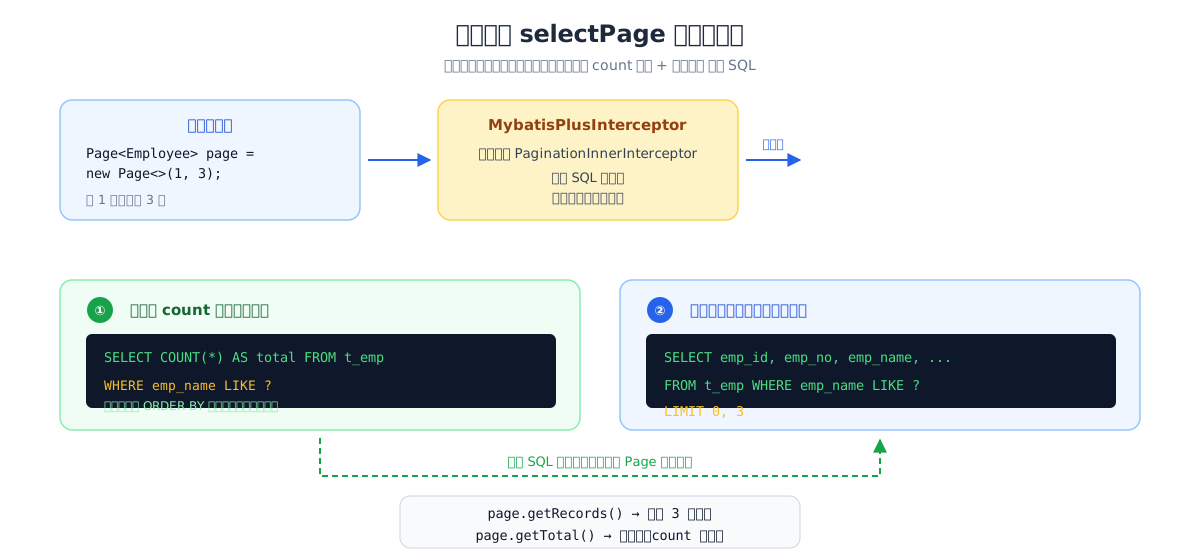
流程要点:
- 我们传入
Page(1, 3)和条件 - 分页插件拦截 SQL 执行,拆成 count 查询和数据查询两段
- 两段结果组装进同一个 Page 对象返回
五、分页 + 条件构造器
分页和条件查询天然配合,条件是 QueryWrapper / LambdaQueryWrapper 都行:
@Test
public void testSelectPageWithCondition() {
    // 分页:第 2 页,每页 2 条
    Page<Employee> page = new Page<>(2, 2);

    // 条件:查询部门 1 的员工,按工资降序
    LambdaQueryWrapper<Employee> wrapper = new LambdaQueryWrapper<>();
    wrapper.eq(Employee::getDeptId, 1)
           .orderByDesc(Employee::getEmpSalary);

    Page<Employee> result = employeeMapper.selectPage(page, wrapper);

    System.out.println("total = " + result.getTotal());
    System.out.println("pages = " + result.getPages());
    result.getRecords().forEach(System.out::println);
}
==>  Preparing: SELECT COUNT(*) AS total FROM t_emp WHERE dept_id=?
==> Preparing: SELECT emp_id,... FROM t_emp WHERE dept_id=? ORDER BY emp_salary DESC LIMIT 2,2
注意:条件(WHERE、ORDER BY)在 count 查询和数据查询中都会带上,结果一致。
六、分页对象常用方法
| 方法 | 含义 |
|---|---|
getRecords() | 当前页数据列表 |
getTotal() | 总记录数(count 查询结果) |
getPages() | 总页数(框架自动计算) |
getCurrent() | 当前页码 |
getSize() | 每页条数 |
hasNext() | 是否有下一页 |
hasPrevious() | 是否有上一页 |
七、常见问题
| 问题 | 原因与解决 |
|---|---|
分页不生效,LIMIT 没出现在 SQL 里,查出来还是全部 | 忘了配置 MybatisPlusInterceptor + PaginationInnerInterceptor,或配置类没被扫描到 |
Page 导包报错 | 用 com.baomidou.mybatisplus.extension.plugins.pagination.Page |
| 数据量大时 count 查询慢 | 项目后期可优化:数量级小时先不管;必要时使用 Page(long current, long size, boolean searchCount) 关闭 count 查询 |
八、本章小结
- 三步使用:配置分页插件 → new Page(页码, 每页条数) → 调用 selectPage
- 插件自动执行 count + limit 两段 SQL,组装成 Page 返回
- 分页与条件构造器(LambdaQueryWrapper)天然配合
- 忘记配置插件是分页失效最常见的原因
下一章学习更新操作的进阶用法:UpdateWrapper 局部更新。